The latest Android Ice Cream Sandwich release was keenly awaited by Indic languages as the earlier versions did not provide native support. I upgraded the OS in my Google Nexus S and found that Tamil is supported well in some native apps. Earlier we could only rely on some external android apps or hacks to view Tamil.
You can view the screenshots below with captions to understand the issues.
Here is a summary of the issues I observed:
1. Tamil is shown well in Android’s native browser and Facebook app. However, the letters are seen scrambled in many other apps like Twitter, Music and SMS.
Inference: Android provides native support for Tamil but the apps also have to code well to show it. Is it possible to do a single app that will fix this problem in all other apps present?
2. Tamil, Bengali, Marathi and Hindi are the only Indian languages supported for now. Oh ya, it can also show English well without a problem 😉
But, how did they choose these four languages? Possible guesses:
* Languages by number of speakers (But Telugu has more speakers than Tamil) ?
* Possibility of revenue generation in these languages (Ad revenue in all Indic languages are almost nill or equal) ?
* Based on the activity online? (I would guess that it is based on the volume of content, search queries, people using Google interfaces in their language).
* Developers passionate in their own language? (very much possible)
* National language status? ( Hindi, Tamil, Bengali are national languages in different countries. But choice of Marathi can’t be explained)
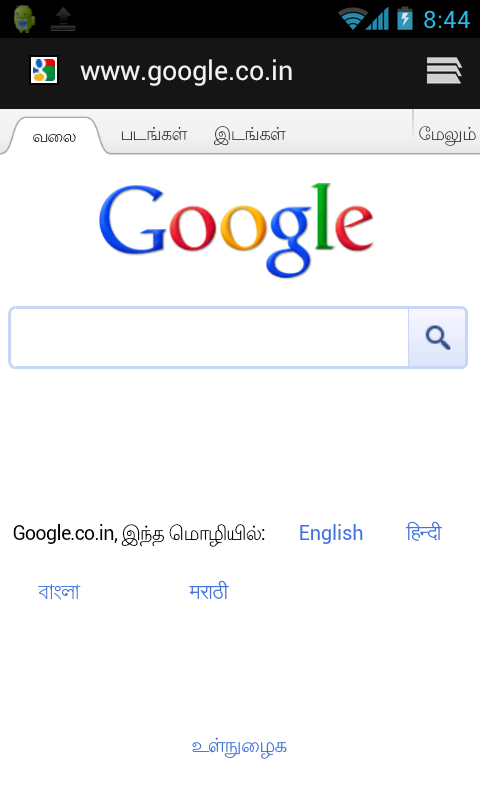
Android ICS Pro Tip: You can take screen shots like this by pressing the volume+power button together. The screen shots will be stored in your gallery. Then, you can share them easily across the web.
Comments
19 responses to “Android ICS support for Tamil and Indic languages”
Dear Ravi
Well made report.
In addition please do test the following having web font:
http://translatewiki.net/wiki/Main_Page?setlang=ta
Actually the above is intended to render correctly in any browser due to web font being used which is enabled by default (“Lohit Font” web font) in the “எழுத்துரு மாற்ற” (To change font) link at the top.
In my Samsung Galaxy S-II with Android 2.3.3 without native support for Tamil, can read the above site clearly in the native browser. However it quickly crashes when we try to navigate or magnify the page.
Want to know how it is in your ICS.
~Sethu
மகிழ்ச்சியாக இருக்கிறது.
//But, how did they choose these four languages? Possible guesses:
* Languages by number of speakers (But Telugu has more speakers than Tamil) ?//
Well, Punjabi also (total number ~ 109 million) spoke by larger population than each of Marathi and Tamil.
Regarding Marathi’s inclusion over say Punjabi, the reason could be that Hindi and Marathi are among many languages that use Devanagari script apparently with some variations, which I guess could be in orthography and also few additional or less characters. It may be that for Marathi script (“Balbodh” script which is apparently a slight variant from Hindi Devanagari) the rendering layout stack easily follows that developed for Hindi.
Any idea on whether other Devanagari using languages (Nepali, Konkani, Sindhi, Kshmiri, Sanskrit, Maithili.. to name a few ) have got similar “native support”?
I’m on 2.3.3 (Gingerbread) and my phone supports all Indic languages. ICS has got nothing to do with this.
Dear Netcraze
It is not clear what you really want to point out that ICS has got nothing to do with this.
ICS = Ice Cream Sandwich is the codename for Android 4.0 series just as Gingerbread is for version 2.3 series and Honeycomb for 3.0 series.
In Gingerbread series only some phone brands and models had included full native support – Samsung Galaxy Ace and also Galaxy S (not S-II) that I have heard of. I have heard that some Sony Ericsson Experia version also and may be few others.
It is not correct to say that all phones using a Gingerbread version have native support (For example my Samsung Galaxy S-II I9100 does not have it).
It is with ICS version that Android developers have included full native support for the 4 languages that Ravi mentions. This means that new phones coming with ICS or older phones getting upgraded (via frimware upgrade provided by phone maker) to ICS will all (regardless or brand or model ) would have uniformly the same level of support!
Hey bro,
You say that Tamil language supports in browser…. But does it support in all other applications? I mean if i use a Tamil Bible and a Tamil newspaper, can i read the fonts?? Btw i have Galaxy s2…
thanx in advance 🙂
Very correctly mentioned by Mr. Sethu. I would like to clarify that .doc was not supported by google Android aosp at all, from ics onwards it is supported by google, earlier it was supported by handset manufactures for some models only.
amnesty is there any way type indic text in Android ics. I am using ics for some days but it does not look that Google support it out of box.May be I have to look for some third party application.
Thanks for the report! I wanted to make a switch from the iPhone and now I can!! 🙂
Piyoosh : //I would like to clarify that .doc was not supported by google Android aosp at all, from ics onwards it is supported by google, earlier it was supported by handset manufactures for some models only.//
Yes I observed that in my Samsun Galaxy S-II with Android 2.3.3 – in both Polaris Office and Olive Office no rendering of Tamil (even the broken apperance in native is not seen instead only blank boxes appear).
In contrast with the same phone in some other apps like the native Browser or Memo etc the rendering of Tamil is there but without GSUB working (so some ligatures like the ukara, uukaara mixed consonants fall back to GPOS type appearance). This incomplete rendering is possibe if akshar (or maduram) font is used after installing with Fontomizer without having to root the phone.
Piyoosh: //amnesty is there any way type indic text in Android ics. I am using ics for some days but it does not look that Google support it out of box.May be I have to look for some third party application.//
I don’t know if you meant to address that question to us here (because you seem to have addressed the question to one “amensty”?)
Nevertheless for the benefit of readers here I wish to present some of the IMEs I have tried so far in my Android 2.3.3 on Samsung Galaxy S-II (GT-I9100):
1. ThamiZha! -Tamil Visai : https://market.android.com/details?id=com.tamil.visai
===========================
This is for inputing Tamil unicode only but it can be also used from Android devices not having native support for Tamil unicode, since it provides a own input display cage for which only the input stream is converted to 8-bit TSCII encoding. The input content to the application to which we type in, remains Unicode.
This IME comes with 3 types of keymaps: Tamil99, Phonetic with Tamil keys, Phonetic in addition to English keymap.
I use this because of the presence of Tamil99 which i use regularly in Desktop PCs and Laptops, but this in Android has not included important intelligent rules (mainly features related to auto pulli) which really are important needs for greater efficiency of Tamil99 typing.
I hope the developers improve on those non-complinaces
2. Sparsh Indian Keyboard : https://market.android.com/details?id=com.sparsh.inputmethod
=========================
This does not have own input display cage like the above so this is usable only in phones with native support or like those with fall back unicode font support installed, for example via Fontomizer as in my phone.
In addition to English it comes with keymaps for 3 languages : Hindi, Tamil and Kannada.
The keymap I have tried so far is for Tamil and it uses a concept whose time has come with the emergence of touch sensitive mode of interfacing.
Basically when we use the Tamil keymap, we get a bottom half screen layout of all the vowels and alpha consonants (க,ங,….). See: https://sites.google.com/site/skhome/android-scrns/sparsh-kb1.jpg
If user wants to get the pure consonant (say for example ம்) or a consonant-vowel syllable (for example one of மா, மி, மீ,…மோ, மௌ) the user touches and holds the corresponding alpha-consonant (ம in our example) which results in an additional chocie screen with all those syllables and pure consonant. See: https://sites.google.com/site/skhome/android-scrns/sparsh-kb2.jpg
The user then has to move the finger (like the “Swype” keypad native of Android for English ) to the pure consonant or the consonant-vowel syllable.
3. Panini Keypad; http://www.paninikeypad.com/
==============================
This provided keypads for 11 indic languages (and you are interested in such large number of languages?) for Unicode only – i.e. like Sparsh Indian Keyboard above doesn’t have own display cage.
It works alright in my Galaxy S-II / Android 2.3.3 (of course with the incomplete rendering in my phone). However I find the Tamil keypad use in this less convenient than with the above two.
4. Tamil Keyboard – JavaMAK https://market.android.com/details?id=com.mak.tamil –
=========================
This one also for Unicode like the two above without any input display cage. I have found this to be also less convenient compared to the first two and also I have found a few bugs in this.
I recommend to the users of Tamil to try out the first two of the above 4 and share your experiences and opinions.
Dear Sethu, Kindly let me know.. How to enable tamil. I am als waiting for that. When are they going to release 4.0 ICS for samsung galaxy S2. I am also using that. Does 4.0 ICS support tamil unicode?
Dear Eswaran
I will go in the reverse order of your questions.
>>
Does 4.0 ICS support tamil unicode?
<<
Yes ICS has "native" support for Tamil Unicode as Ravi has explained in this blog. Read there again about exceptions with some applications and also difference between having native support and not having.
//When are they going to release 4.0 ICS for samsung galaxy S2. I am also using that.//
From what I had seen in Internet articles so far, the ETA (Expected Time of Arrival) for the official roll out has not been announced officially. But general expectations seem to be by the end of January 2012.
Here, by "official roll out" I mean the release of a stable ICS (i.e. 4.0.x) series firmware ROM upgrade for S2 – GT-i9100 by Samsung. When an official and stable version is released one could install with one of the following methods (I have no clear knowledge about the first two methods – they are only guesses based on what i've read)
1. OTA – Over the Air – via Software Update facility in phone (so no need of a PC to assist)
2. OTA – via Kies software in a PC (Windows or Mac. – yes, grrr.. no Linux yet) and phone connected to PC via USB cable (or interfaced via wireless Kies through wi-fi?). In this "Kies" software would download the upgrade and manage installation while being online. The Kies software is a proprietary of Samsung and is usable for the firmware upgrades as well as for synching files between the phone and a PC .
3. Offiline installation – Download the full package to PC (Windows or Mac) and then install via USB cable using Odin client in PC. Odin client does the installation of already downloaded package so no need to be online during installation.
(The driver for USB cable whether for using with Kies or with Odin are the same. The drivers packages can be downloaded and installed separately or as part of the Kies program installer itself)
While a stable official release is much awaited by the S2 users, so called "leaked" versions have been coming out continually since last October or so. These are developer's versions which are referred to as the beta versions and in the recent weeks (since 30th Dec ) there has been more frequent releases.
Have a look at this article http://droidangel.blogspot.com/2012/01/i9100xxlp1-i9100xxlp2-android-403.html which lists the "leaks" for S2. There has been so far 5 upgrades to reach 4.0.3 with the latest XXKL2 released on the 14th January.
This type of "leaked" versions are installed with the 3rd of the above methods only – i.e. using "Odin" to install the package downloaded to a PC via USB cable tethering.
The XXKP8 released on Dec 30th was what I used for upgrading my S2. There are some bugs in that such as some applications freezing or crashing but the basic required functionalities are working fine for me. So I would go for next upgrade when I could allocate sufficient time or even wait till the time the stable release gets rolled out.
These beta versions are also installed without having to root the phone. So your warranty terms are not supposed to be affected.
However be aware there are no guarantee on the procedures shown in many web sites for upgrading with a leak. You have to judge from your own understanding whether venturing with betas on your own before stable version comes is a risk you could take or not.
Here is a "How-to" from androidadvice.com which one could read for a start : http://androidadvices.com/update-samsung-galaxy-s2-gt-i9100-xxlp2-ics-android-403-firmware/
I will write later again on various programs available for backing up data and applications.
Does Anriod 4.0 support Sindhi language in arabic script (right to left). Sindhi in arabic script is supported by uni code softwares like windows, does anriod support sindhi??
So, the ‘works in some apps, not in others’ – it works in apps that are mobile webkit based. This means it will work perfectly in native browser, Facebook app, Wikipedia official app, etc – that use a webview. Native Java rendering is broken, and I’m not sure how much possible it is to fix that.
In short – full support has been added to the webkit version that ships with 4.0, and broken support in the native text renderer
where is the file ,how can I download, need link foe all indians fonts for andriod samsung sii,pl reply
does ICS will support tamil apps like tamil newspapers magazine etc because i have honey comb tab tamil apps not showing
Languages by number of speakers (But Telugu has more speakers than Tamil) ? the below imformation give the answer.thing globaly. ics for international not only for india.
Pos Language Family Script(s) Used Speakers
(Millions) Where Spoken (Major)
1 Mandarin Sino-Tibetan Chinese Characters 1151 China, Malaysia, Taiwan
2 English Indo-European Latin 1000 USA, UK, Australia, Canada, New Zealand
3 Spanish Indo-European Latin 500 Mexico, Central and South America, Spain
4 Hindi Indo-European Devanagari 490 North and Central India
5 Russian Indo-European Cyrillic 277 Russia, Central Asia
6 Arabic Afro-Asiatic Arabic 255 Middle East, Arabia, North Africa
7 Portuguese Indo-European Latin 240 Brazil, Portugal, Southern Africa
8 Bengali Indo-European Bengali 215 Bangladesh, Eastern India
9 French Indo-European Latin 200 France, Canada, West Africa, Central Africa
10 Malay, Indonesian Malayo-Polynesian Latin 175 Indonesia, Malaysia, Singapore
11 German Indo-European Latin 166 Germany, Austria, Central Europe
12 Japanese Altaic Chinese Characters and 2 Japanese Alphabets 132 Japan
13 Farsi (Persian) Indo-European Nastaliq 110 Iran, Afghanistan, Central Asia
14 Urdu Indo-European Nastaliq 104 Pakistan, India
15 Punjabi Indo-European Gurumukhi 103 Pakistan, India
16 Wu Sino-Tibetan Chinese Characters 90 China
17 Vietnamese Austroasiatic Based on Latin 86 Vietnam, China
18 Javanese Malayo-Polynesian Javanese 85 Indonesia
19 Tamil Dravidian Tamil 78 Southern India, Sri Lanka, Malyasia
20 Korean Altaic Hangul 78 Korean Peninsula
21 Turkish Altaic Latin 75 Turkey, Central Asia
22 Telugu Dravidian Telugu 74 Southern India
23 Marathi Indo-European Devanagari 72 Western India
24 Italian Indo-European Latin 62 Italy, Central Europe
25 Thai Sino-Tibetan Thai 60 Thailand, Laos
26 Burmese Sino-Tibetan Burmese 56 Myanmar
27 Cantonese Sino-Tibetan Chinese Characters 55 Southern China
28 Kannada Dravidian Kannada 47 Southern India
29 Gujarati Indo-European Gujarati 46 Western India, Kenya
30 Polish Indo-European Latin 46 Poland, Central Europe
Hey loser dont even think about it, TAMIL is the one and only living language even from the stone age. and spoken by more and more people around the world. It is the fastest learning lang by all kind of people in the world. here are some testimonies. Read completely.
TAMIL is a Dravidian language spoken predominantly by Tamil people of South India and North-east Sri Lanka. It has official status in the Indian state of Tamil Nadu and in the Indian union territory of Puducherry.
Tamil is also a national language of Sri Lanka[7] and an official language of Singapore. It is one of the 22 scheduled languages of India and is the first language that was declared a classical language by the government of India in 2004.
Tamil is also spoken by people in Malaysia, USA and Mauritius as well as around the world.
Tamil is one of the longest surviving classical languages in the world according to available evidence.
It is also the only Indian language other than Sanskrit to be considered to be ancient and authentically original in its form and rich literature[8][9]
It has been described as “the only language of contemporary India which is recognizably continuous with a classical past”[10] and having “one of the richest literatures in the world”.[11]
Tamil literature has existed for over 2000 years.[12]
The earliest epigraphic records found on rock edicts and hero stones date from around the 3rd century BCE.[13]
The earliest period of Tamil literature, Sangam literature, is dated from the 300 BCE – 300 CE.[14][15]
Tamil language inscriptions written c. 1st century BCE and 2nd century CE have been discovered in Egypt, Sri Lanka and Thailand.[16]
The two earliest manuscripts from India,[17][18] to be acknowledged and registered by UNESCO Memory of the World register in 1997 and 2005 were in Tamil.[19]
More than 55% of the epigraphical inscriptions (about 55,000) found by the Archaeological Survey of India are in the Tamil language.
Tamil language has historical influence in Indonesia and thailand
I can read Marathi language on my Samsung Ace plus which has Android 2.3.6 version (gingerbread) but can’t send sms and mail as it does not have Marathi/Devnagari key-board ( or phonetic keyboard which is rather more convenient). Would installing of Android 4.0 version will resolve this issue ?