Android OS for mobile phones is yet to have inbuilt support for Tamil Unicode fonts.
However there are some free apps that support to read and write Tamil Unicode font in Android apps and browsers:
* Tamil Visai – To type Tamil in any Android app using transliteration, Tamil99 keyboard. Using this you can publish in Unicode Tamil font in websites. You can also send Tamil SMSes to other phones supporting Tamil display.
* SETT browser – To display Tamil Unicode text properly.
* Opera Mini browser can display Tamil Websites as bitmap images. Select YES for “Use BitMap fonts for complex scripts” in the settings.
But still, there is no inbuilt support yet. So, you cannot see Unicode Tamil text in all applications. You can’t read Tamil SMSes and there is no Tamil interface yet. Since Android is a open source software and Indic market can’t be ignored for long, we can hope to see inbuilt Tamil support soon in Android.
If you are power user, you can root your android phone and install Tamil Unicode font provided by Krishnan.
If you are an application developer, you can use TSCII fonts to display Tamil letters in your app.
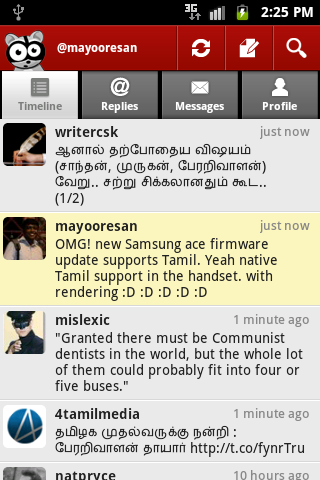
The latest news is that Samsung Ace mobile phone gives native support for Tamil in Android OS. ( Tip: @mayooresan )
See also:
* How to guide for typing Tamil in Nokia cell phones
Related posts:
* Tamil font converters
* Tamil typing software
* Download free Tamil fonts
Comments
30 responses to “Tamil in Android mobile phones”
Ravi,
I met you in Tamil 99 keyboard workshop on World Tamil classical language conference.I am now working as an android application developer.I have interest to bring Tamil support to android phones.Please guide me to do that.How to proceed for enabling tamil support to android.
there are two main tasks that you need to do
1. Replace the system font with Tamil font (atleast he fallback font)
2. Enable rendering support for Tamil (HarfBuzz is the rendering engine used by Android)
Technically first task is easy to achieve anyone can root their phone and do it. Second task is the challenging one. Don’t ask me the technical details, if I knw I would have done long time back 😉
Also worth a look at http://xkrishx.wordpress.com/2011/07/30/tamil-unicode-font-for-android/
//Since Android is a open source software and Indic market can’t be ignored for long, we can hope to see inbuilt Tamil support soon in Android.//
Being open source alone would not ensure that a particular language / script gets necessary and sufficient attention automatically on i18n issues and developments. What is more important, I think, is contribution of enough man-power efforts from persons skilled in the intricacies of implementing for the language. I would wish that skilled persons get more involved in such development’s rather going for some short term alternative / fall-back solutions.
I do not think HarfBuzz is ignoring Indic. Regarding HarfBuzz developments for Indic scripts including Tamil, you can see about testers in this page: http://freedesktop.org/wiki/Software/HarfBuzz/Indic
According to that Mugunth, Shriramana Sharma and Vinodh Rajan are participating for testing Tamil. Hopefully we could hear from them on the progress and why inclusion Text layouts for Tamil and other Indic scipts in HarfBuzz rewrite is taking so long.
As regards an Unicode encoded Font having Tamil, customized fonts such as the one used by SETT browser is not Unicode font, but uses Unicode Tamil range to fit in glyphs from 8 bit font (in case of SETT from Bamini font) for the basic Unicode characters (without Unicode’s combining properties) and also uses 50 or so vacant spots in Tamil Unicode range for fitting ligatures. So the code points in an Unicode encoded Tamil content gets converted to those rearranged code points (effectively like an 8-bit font) which since they are inside Tamil range do not interfere with other language scripts.
That’s in font for SETT browser; and from the replies that Krish wrote to queries in his web site, I guess his font customization is also on similar lines only. Such customization do not give you an “Unicode Font”
Thanks for the info, Sethu. Sad to know the state of current efforts 🙁
The font used in android tamilvisai preview is tscii ..
நன்றி ரவி தகவல் சேர்த்தமைக்கு.
இந்த மறுமொழியும் தொலைபேசி வாயிலாகவே இட்டேன்.
Mayooresan on August 1, 2011 at 1:45 pm wrote:
//Technically first task is easy to achieve anyone can root their phone and do it. //
I for one, have never been able to do the so call “rooting” in my Sony Ericsson – Experia-X10 Mini Pro. I had tried with quite a few methods / downloaded apps found via searching and never succeeded! Why do they have to make it so difficult?
That was a earth shattering shock for me when I bought HTC wildfire S. Good news is that HTC provided unlocked bootloader recently thanks to that I could finally root my phone. But still disappointment that indic rendering yet to be added n I can’t just install a Tamil font.
I don’t know if there is a way for u other than the phone mfg decides to give unlocked boot loader.
…HarfBuzz is the rendering engine used by Android
இன்று புதிதாய் ஒன்று கற்றுக் கொண்டேன். Samsung Aceல் தமிழ் ஆதரவு தன்னியல்பாக உள்ளதும் இதுவரைத் தெரியாதது. நன்றி.
Hi all,I am from srilanka, i bought A xperia-sony Ericsson, how can i add Tamil software or Tamil font
THANKS
MOBILE+94777424396
[…] may also read more about Tamil in Android via Ravi’s post. Posted in Tutorial SHARE THIS Twitter Facebook Delicious StumbleUpon E-mail […]
Hi friends. now all indian language support lg optimus one gingerbread version 3.3.3
அன்புள்ள இரவி
தமிழ் விசை செயலியை இறக்க இயலவில்லை?
மற்ற செயலிகளை இறக்க முடிகிறது.
தமிழ் விசை இறக்கம் குறித்து வேறு ஏதாவது விளக்கப் பக்கங்கள் உள்ளனவா?
நண்பர் முகுந்தும் இது குறித்து ஒரு மின்னஞ்சல் எழுதியாக நினைவு.
@rahul, Gingerbread versions are 2.3.x.. . Versions 3.x.y.. are Honeycomb. I guess what you have is 2.3.3 (gingerbread)
ஆண்ட்ராய்த் இயங்குதள கைபேசிகளில் ஓப்பரா மினி மற்றும் தமிழ்விசையுடன் ரூட் செய்யாமலேயே எனக்கு போதுமானதாக உள்ளது
[…] The latest Android Ice Cream Sandwich release was keenly awaited by Indic languages as the earlier versions did not provide native support. I upgraded the OS in my Google Nexus S and found that Tamil is supported well in some native apps. Earlier we could only rely on some external android apps or hacks to view Tamil. […]
Android 2.3.3 supports Tamil.the native browser shows Tamil without Amy problem.and even in contacts, Facebook all shows in fav kill without any problem. But opera mini still have problem. I need opera to display Tamil natively not through bitmap
Dear Srini,
Please inform here in *which phone make / model* that you find Andriod 2.3.3 support for Tamil in native browser, contacts and Facebook working without any problem?
dear Ravi
I zm using samsung galaxy s2. android 2.3.6 but still not able to see tamil. why? how you only got.
but hindhi is there…
Dear Sethu,
I have LG Optimus One (P500) which has stock ROM (V20C) running Android 2.3.3. I am able to read plain text files containing Tamil characters with conjuncts rendered properly. I am able to copy the characters from text file to contacts and even create notes for the contacts in Tamil.
I changed the ROM to cyanogenmod 7 RC1 which did not display the Tamil characters in contacts and text files and was displayed as boxes. I tried to replace DroidSansFallback.ttf and even copied DroidSansHindi.ttf and I was able to read Tamil characters, but conjuncts like (uir mai characters) are not rendered properly. Hence though it was okay, but reading was not pleasure and slow.
Then I returned back to my stock ROM mentioned above and the same file displayed properly.
I also attempted to open DroidSansHindi.TTF in computer and could see Tamil and Telegu characters in the file.
Another info I would like to share is that I transferred the text file to other friend’s mobile and follow are the result:
1. Sony Ericsson X10 pro mini, 2.3.3 not able to read (boxes)
2. Samsung Galaxy Tab p1010, 2.3.3 able to read perfectly.
3. Samsung Galaxy Y, 2.3.3, able to read perfectly.
I am planning to do this attempt to confirm that ROMs specific for Indian customers seems to work.
Just thought of sharing all these for other’s benefits. I am ready to share the font files from stock rom for others to test as well.
Narayanan (S e n d t o n a r a y a n a n @ g m a i l . c o m)
Having Sony ericsson XPERIA minipro want to down load tamil software kindly if there any one to help me in this regard
Install Opera mini.
In the browser address bar, type in “opera:config” (without the quotes) and then go. This will take you to the opera settings page.
Find the option that says “Use bitmap fonts for complex scripts” . The default is “no” for this option. Change this option to “Yes” and click save.
Once this is done. u can read the tamil fonts in the browser.
solution from : https://groups.google.com/a/googleproductforums.com/forum/#!category-topic/android-market/technical-help/GSglL6-DqxQ
Opera Mini wont support the “opera:config” option. You need to download Opera Mobile. It is heavyweight browser.
hi sir am using android Lg optimus p500. i need tamil language read (can’t read because not in tamil font) so how to install tamil font please sir tell me & plz send tamil font software sir. this my mail id
[email protected]
[email protected]
In your phone
Goto Settings>Display>Screen Display>Font Style
It will open up a Pop up screen. There select Get Fonts Online. It will go to Market. There download Fontomizer software.
In that select Tamil and download tamil fonts.
pls advise me for galaxy S2 to install Tamil fonts to view, edit, type in facebook and other networks…my mail id [email protected]
i am manoj. Pls tell me how to install tamil font fmaor view,edit and type in my galmaxy s2
…my id is [email protected]. thks….
Visit http://www.sarankumarnm.blogspot.com for Android Tamil Applications
Samsung Galaxy Mini S5255, How to install Tamil Font? Plse Reply me Friends……………………..
please guide me how to send sms in Tamil, i use samsung galaxy y phone. i know nothing about android and rooting and anything to this regard.